Best AI Creative Tools for Brand Designers & Content Creators

AI
CREATIVE TOOLS
AI CREATIVE TOOLS
A WORKFLOW-BASED GUIDE (FROM SOMEONE WHO ACTUALY USES THEM)
Let’s be honest: there are so many AI creative tools right now, and half the internet will tell you theirs is “the best.” It can be a little overstimulating and a bit overwhelming when there are so many different platforms being promoted in your face all the time.
But as a brand designer and content creator, I’ve learned that the best tool depends on the job and/or project.
Branding is different from social content. Client work is different from experimenting. And speed without a strategy? That’s just chaos with a login. Am I right?
So instead of trends, this guide breaks down which AI creative tools are best for each part of a real creative workflow: branding, social, campaigns, client work, and scaling content without losing your mind.
This is a reference-style guide designed to help you confidently answer:
What is the best AI creative tool for my needs?
Which AI tools are best for photo editing vs video editing?
When should I use one tool over another, and why?
And, some helpful FAQs too.
HOW to CHOOSE the RIGHT AI CREATIVE TOOL (decision framework)
Before we even talk tools, here are the questions I ask myself every single time.
Ask yourself:
Do I need control or speed?
(Sometimes you can’t have both, and that’s okay.)Does this need to be brand-consistent?
Huge for client work and long-term brand systems.Is this for exploration or execution?
(Hello passion projects)Where does this live?
Desktop, mobile, social, video, or all of the above?Can I use this commercially?
Important… and very often skipped.
Once you answer those questions, the “best” AI creative tool usually becomes very obvious.
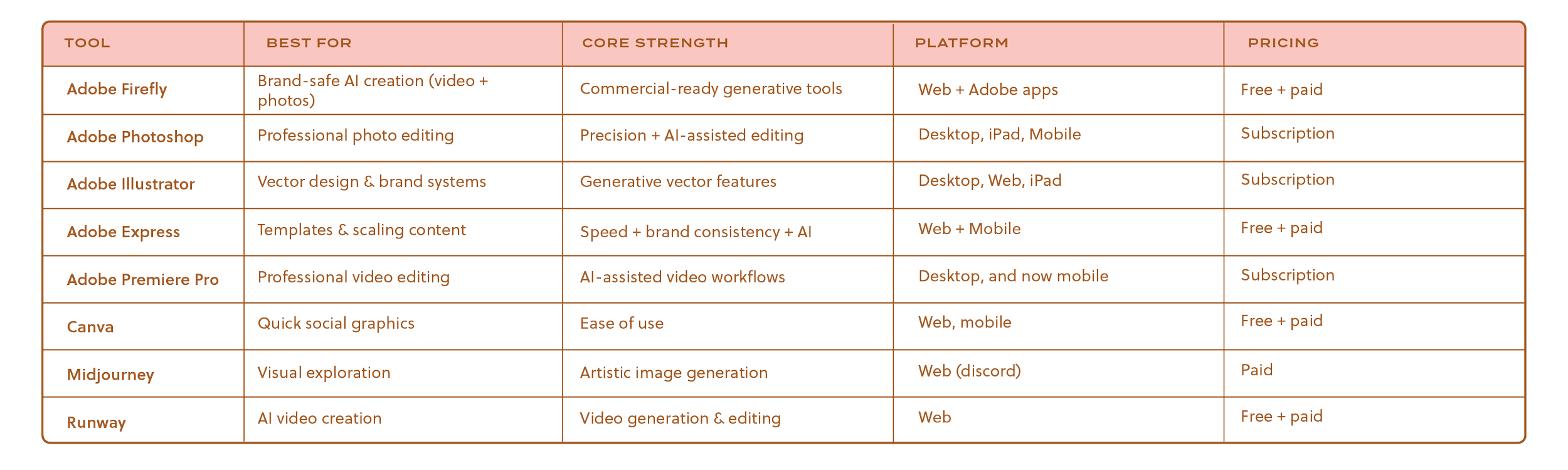
QUICK COMPARISON: BEST AI CREATIVE TOOLS at a GLANCE
MY PHILOSOPHY on USING AI as a BRAND DESIGNER
I don’t believe in one “all‑in‑one” AI tool that magically does everything well. I mean, it would be amazing if we had one platform that did it all, but we’re just not there yet and I don’t know if that will ever be realistic. Every platform and/or tool serves a purpose.
If a tool claims it can handle branding, strategy, social content, video, web design, and creative direction all in one place… I’m already side‑eyeing it. (Again, that would be a dream, but not realistic). Not because it’s useless, but because good creative work doesn’t happen in one lane.
Branding is layered. Content is layered. Strategy is layered. And great creative workflows reflect that.
That’s why I don’t build my process around tools. I build it around workflow.
Here’s the thing: AI doesn’t replace taste or style. It never will.
Taste and style is knowing when something feels off even if you can’t explain why. It’s editing. It’s choosing not to use the flashy option just because it exists. AI can generate options all day long, but it can’t tell you which one actually aligns with the brand, the audience, or the long‑term vision.
That part? That’s still you. I like to say your taste and style is a feeling.
My background as a brand designer heavily shapes how I use AI. I don’t open a tool asking, What can this make for me? I open it asking, What do I need right now in my process?
Sometimes I need:
Exploration without commitment
Speed without sacrificing consistency
Variations without rebuilding from scratch
Systems that scale instead of one‑off assets
AI becomes incredibly powerful when you approach it with intention and thoughtfulness instead of curiosity alone.
Another thing I’ll say (lovingly): tools are not the work.
I see so many creatives jump from platform to platform thinking the next tool will fix their workflow. But if your process is unclear, adding more tools just adds more tabs. More logins. More chaos.
A strong workflow looks like:
Knowing what stage you’re in
Choosing the tool that supports that stage
Moving on when its job is done
That’s why workflow will always matter more than tools.
AI works best when it’s supporting an already‑thoughtful process. It helps you move faster once you know where you’re going. Without direction, it just gives you more options to sort through, and the way my brain works I’m already exhausted thinking about it.
So no, I don’t believe in one perfect AI tool.
I believe in:
The right tool at the right time
Creativity led by taste, not automation
Systems that support the work instead of distracting from it
AI is an assistant. A very helpful one. But I’m still the creative director around here.
HOW AI FITS INTO BRAND STRATEGY (not just design!)
Throwing this out there, AI is not brand strategy. It’s not positioning, it’s not messaging, and it’s definitely not intuition. It will not sit with a founder, ask the hard questions, or uncover the emotional reason someone chooses one brand over another.
But, when strategy is clear AI becomes an incredibly powerful support system.
I like to think of AI as the assistant that helps me move faster once the thinking is done.
Here’s where AI fits beautifully inside brand strategy work:
1. Translating strategy into visuals
Once brand foundations are defined (values, tone, audience, positioning), AI tools help visualize those ideas quickly. Mood boards, concept imagery, mockups, this is where AI shines.
2. Iteration without burnout
Brand design requires exploration and brainstorming. Lots of it. AI allows you to explore more directions/ideas without manually rebuilding everything from scratch.
3. System thinking, not just assets
Strong brands are systems, not one-off designs. AI helps test how a logo, pattern, or color system behaves across multiple touchpoints. (cue: what does a brand pattern look like on a cup?) I love using AI to create mockups that are unique to a brand that I’m designing for this exact purpose.
4. Scaling with intention
Once a brand is established, AI tools help scale content without diluting identity. That’s huge for social, campaigns, and long-term growth.
What AI should not do:
Decide brand voice
Replace creative judgment
Shortcut strategy
AI doesn’t replace thinking, it rewards it. The clearer your direction, the better your AI outputs will be.
WHAT EACH AI TOOLS REALLY DOES (a short & sweet breakdown)
ADOBE FIREFLY
Best for: Brand designers, marketers, client deliverables (But, honestly anyone can use Firefly)
Why it works: Built with commercial use in mind, so you don’t have to second-guess licensing.
Perfect workflow moments:
Mood boards and mockups
Generative fills and expansions
Creating visual variations quickly
Creating videos (Also, you can turn the mockups you create into videos, which I think is pretty amazing! This is perfect if you want to add some extra sparkle to your client presentations to help your clients visualize what their branding will look like IRL)
Adobe Express
(AI-PoweredContent Scaling)
Best for: Scaling content across social and campaigns
Why it works:
Brand kits + templates + resizing + QR codes + integrations (Dropbox, Google Drive) = content batching bliss.
AI text suggestions & layout assist
AI color and style harmonization
AI image suggestions and auto-cropping
One-click, context-aware resizing
Automatic background removal and smart fill
Generate Presentations using AI
Perfect workflow moments:
Social posts, story packs, marketing rollouts. Pairs with Photoshop or Illustrator if you need more detailed editing. Plus, generate presentations using AI without starting from scratch, internal content, and team collaboration.
MIDJOURNEY
Best for: Creative concepting, mockups, mood board inspiration
Why it works: Stunning artistic styles that spark ideas fast.
Perfect workflow moments:
Early-stage ideation
Visual exploration before execution
ADOBE PHOTOSHOP
Best for: Pro creatives who love control
Why it works: AI boosts speed without sacrificing precision.
Perfect workflow moments:
Advanced retouching
Compositing brand imagery
Final image polish for campaigns and web
Photoshop remains one of the best photo editing tools when quality and detail matter. She’s really THAT GIRL!
SN: I love using Photoshop Web to use Generative Upscale Brand Patterns or Images.
Adobe Premiere Pro
(AI-Powered Video Editing)
Best for: Professional video editors, content creators, brand campaigns
Why it works: Premiere combines traditional timeline-based editing with AI-powered tools that seriously speed things up without sacrificing control.
Key AI features that matter:
Text-Based Editing: Edit video like a document (huge for talking-head content)
Auto Captions & Transcription: Accurate, fast, and editable
Scene Edit Detection: Automatically breaks clips into editable scenes
Audio Cleanup & Enhancement: Makes dialogue sound studio-ready
Color & lighting assistance: Faster visual consistency across clips
Perfect workflow moments:
Long-form YouTube videos
Brand campaign videos
Client deliverables that need polish
Repurposing long videos into short-form content
Workflow fit:
Premiere works beautifully alongside:
Photoshop (thumbnails, overlays)
After Effects (motion graphics)
Adobe Express (quick social cutdowns)
If video quality matters, and especially if you’re delivering to clients, Premiere is one of the best video editing software options out there.
FINAL THOUGHTS on PREMIERE:
If Adobe Express is your “get it done fast” video tool,
Adobe Premiere Pro is your “this needs to be GOOD” tool.
It’s not about being flashy, it’s about control, clarity, and delivering video content that actually reflects your brand or your client’s brand.
For creators who are serious about video, especially in campaigns, YouTube, or paid client work, Premiere earns its place in the stack.
Adobe Illustrator
(Generative AI Features)
Best for: Vector design, logos, brand systems
Why it works: AI can help generate vector-based concepts, color variants, and layout ideas all without losing scalability.
Perfect workflow moments: Logo ideation, graphic systems, reusable brand elements.
Adobe Illustrator deserves a little extra love here, it’s genuinely the first thing I open when I sit down to work. I love me some Adobe Illustrator and I’m actually obsessed with the Generative AI features within the app.
Instead of endless manual adjustments, AI can help you:
Explore logo variants quickly
Create vector iterations that stay clean and scalable
Generate pattern, layout, and color system ideas in minutes
You can even create mockups in Illustrator, I mean c’mon.
This especially comes in handy when you’re building brand kits or turning a spark of inspiration into a usable system that can be repeated across social, web, and packaging designs.
And yes, you can even turn your designs into a mockup in Illustrator. I mean, come on. 😍
CANVA
Best for: Easy, at-a-glance visual content
Why it works: No learning curve.
Perfect workflow moments:
Internal content
Team collaboration
Lightweight social graphics
RUNWAY
Best for: AI-powered video creation
Why it works: Combines video generation and editing.
Perfect workflow moments:
Social video
Experimental visuals
Concept testing
Runway is especially helpful when exploring AI video editing and generation workflows.
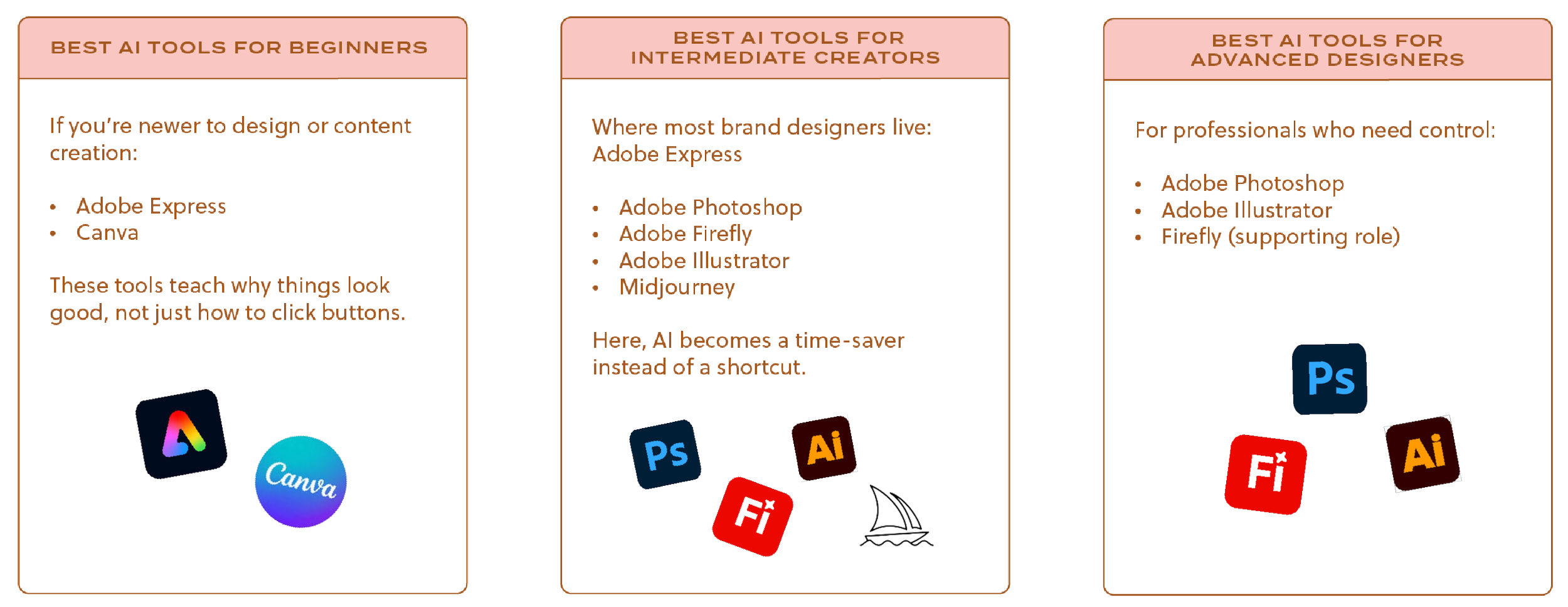
BEST AI CREATIVE TOOLS by EXPERIENCE LEVEL
BEST AI TOOLS for PHOTO EDITING vs VIDEO EDITING
Adobe Photoshop
Adobe Firefly
Adobe Express
These tools support high-quality image editing, brand photography, and campaign visuals.
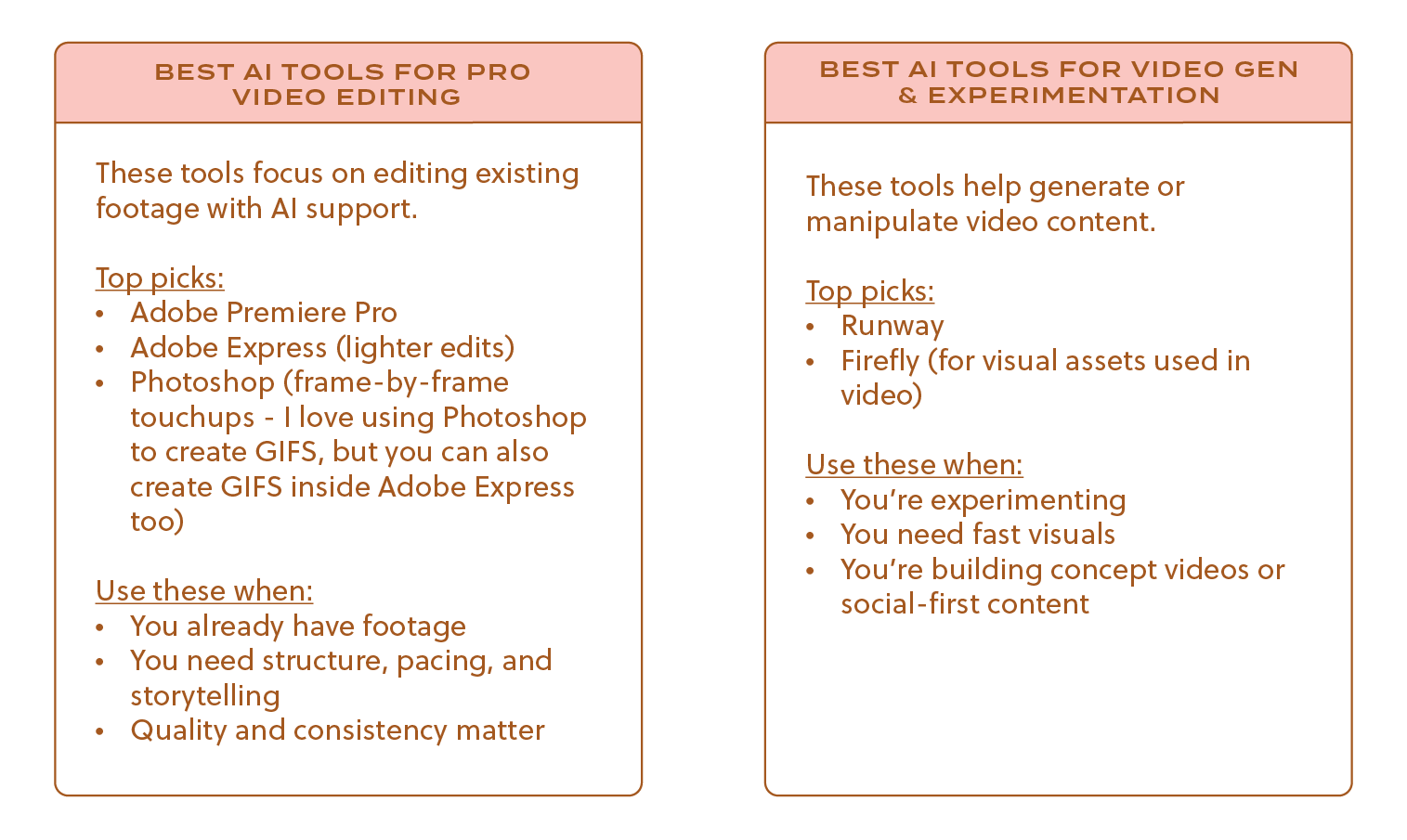
BEST AI TOOLS for VIDEO EDITING vs VIDEO GENERATION
This distinction matters, so let’s spell it out clearly.
REAL-WORLD AI CREATIVE WORKFLOWS
Branding Workflow
Illustrator → Firefly → Adobe Express
Social Content Workflow
Photoshop / Illustrator → Adobe Express → Batch export
Client Campaign Workflow
Firefly / Midjourney → Photoshop / Illustrator → Express / Runway
Video Content Workflow (Start → Finish)
Firefly or Midjourney
→ Generate visual concepts or backgroundsAdobe Premiere Pro
→ Edit main video, clean audio, add captionsPhotoshop
→ Create thumbnails, overlays, still framesAdobe Express
→ Resize clips, add branded motion graphics, export social versionsRunway (optional)
→ Add experimental effects or generated clips
This combo gives you speed, quality, and flexibility — without forcing one tool to do everything.
FREE vs PAID AI CREATIVE TOOLS: WHAT YOU GAIN (and lose)
Free tools are great for:
Learning
Testing workflows
Personal projects
Paid tools are worth it when:
You’re doing client work
Brand consistency matters
Commercial use is required
You’re scaling content regularly
Paid plans unlock better exports, advanced AI features, and peace of mind. Honestly, worth every penny.
REAL-WORLD AI CREATIVE WORKFLOWS
Branding Workflow
Illustrator (logo + vector systems)
Firefly (visual exploration with mockups)
Adobe Express (scaling, add branded templates & brand kits for clients)
Social Content Workflow
Photoshop or Illustrator (core visuals)
Adobe Express (resizing + templates, internal & external team collaboration)
Batch export for scheduling
Client Campaign Workflow
Firefly or Midjourney (ideation)
Photoshop / Illustrator (execution)
Express + Runway (distribution + video)
BEST AI CREATIVE TOOLS by USE CASE
Branding & Visual Identity
Illustrator
Firefly
Photoshop
Social Content
Adobe Express
Canva
Photoshop
Campaigns & Client Work
Firefly
Illustrator
Photoshop
Video Content
Runway
Photoshop
Adobe Express
Templates & Scaling
Adobe Express
Illustrator
Canva
COMMON AI TOOL MISTAKES DESIGNERS MAKE
1. Expecting one tool to do everything
No single tool should carry your entire workflow. That’s how quality drops and frustration creeps in. I mean, it would be amazing if there was one platform that does it all, but we’re just not there yet.
2. Choosing tools based on trends
Just because a tool is popular doesn’t mean it fits your process. Trends don’t pay your invoices, good systems do.
3. Ignoring licensing and commercial use
This one is big. Especially for client work. If you can’t confidently explain usage rights, that’s a risk.
4. Letting AI replace creative thinking
AI should assist, not decide. If every output looks the same, that’s your sign to step back.
AI works best as a collaborator, not a replacement. I like to say that AI is an employee I pay every month.
AI CREATIVE TOOLS — QUESTIONS I GET all THE TIME
If you’ve wondered any of the below, you’re definitely not alone. Let’s break them down in a real, no-fluff way.
Will AI replace brand designers?
Short answer? No. Longer answer? AI might replace certain tasks, but it won’t replace brand designers who understand strategy, storytelling, and taste.
Brand design isn’t just about making things look pretty—it’s about creating meaning, connection, and consistency over time. AI can generate visuals, but it doesn’t understand context, nuance, or emotion the way humans do. It doesn’t sit in client calls. It doesn’t ask why. It doesn’t feel when something is slightly off.
Designers who rely only on execution may feel the pressure. Designers who think strategically and use AI as a tool will be just fine.
Is it okay to use AI for client work?
Yes, with intention, care, and thoughtfulness.
I use AI in client work as a supporting tool, not the final decision-maker. Things like exploration, mockups, visual variations, and scaling assets are great use cases. What matters most is understanding licensing, especially for commercial use, and being confident in how and why you’re using AI.
If you wouldn’t feel comfortable explaining it to a client, that’s usually a sign to pause. AI should protect your professionalism, not complicate it.
Canva vs Adobe Express — which one is better?
This is one of the most common questions I get, and the answer is: it depends on your workflow.
Canva is incredibly approachable and great for teams, internal content, and quick visuals. Adobe Express shines when brand consistency, scaling, and integration with professional design tools matter. Express feels like a bridge between high-level design work and everyday content creation that’s beginner-friendly.
Neither is “better”, they just serve different needs. The key is choosing the one that supports your process instead of fighting it.
Do I need all of these AI tools?
Absolutely not. And honestly, I’d recommend against it.
You don’t need every tool, you need the right combination for how you work. More tools don’t equal better output. In fact, too many platforms usually lead to decision fatigue and half-finished ideas.
Start with one or two tools that solve your biggest pain points. Build confidence. Then expand intentionally if and when it makes sense.
What’s the best AI tool for branding?
There isn’t one single “best” AI tool for branding, and that’s actually a good thing.
Branding is a system, not a moment. Tools like Adobe Illustrator and Photoshop are foundational for building scalable brand assets, while Firefly supports exploration and presentation. AI works best in branding when it enhances your process rather than trying to replace it.
If a tool promises to build an entire brand in one click, that’s your cue to be skeptical.
FINAL THOUGHTS: CHOOSING the BEST AI CREATIVE TOOL forYOU
There’s no single “best” AI creative tool and in my opinion, that’s a good thing.
The magic happens when you use the right tool at the right stage of your workflow. AI doesn’t replace your creativity, it only amplifies it, when used intentionally and thoughtfully.
Think of AI tools like brushes in a design kit. Each one has a purpose. Knowing when to switch tools makes your work better, faster, and way more enjoyable.
So experiment. Iterate. And use AI in ways that serve your vision, not distract from it. ✨
WANT SOME INSPO?
Check out these use cases of how I use AI in my workflow!
Use Case #1 (Adobe Illustrator’s Mockup Tool)
Use Case #2 (Adobe Illustrator’s Gen Shape Fill & Text-to-Pattern)
Use Case #3 (Adobe Firefly - Text to Image)
Use Case #4 (Adobe Firefly - Gen Recolor)
Use Case #5 (Adobe Express - Generate Presentations)