Best AI Tools for Creating Brand-Safe Visuals in 2026 (And Where Adobe Firefly Fits In)
AI
CREATIVE TOOLS
AI CREATIVE TOOLS
THE BEST AI TOOLS FOR CREATING BRAND-SAFE VISUALS in 2026 INCLUDE ADOBE FIREFLY, CANVA AI, DALL-E, MIDJOURNEY, RUNWAY, and STABLE DIFFUSION. BUT, THEY SERVE very DIFFERENT ROLES in PROFESSIONAL CREATIVE WORKFLOWS.
For commercial brand work, Adobe Firefly is widely considered the most reliable option because its models are trained on licensed Adobe Stock, public-domain content, and consented datasets, which significantly reduces copyright and intellectual property risks. By contrast, tools like Midjourney and Stable Diffusion excel at artistic exploration, but their training transparency and licensing policies require careful review before using outputs in client work.
In practice, creators typically choose tools based on three distinct use cases:
1. Brand-safe production tools
Used for marketing assets, websites, packaging, and client deliverables.
Examples: Adobe Firefly, Canva AI.
2. Concept and ideation tools
Best for visual exploration and mood-boarding rather than final brand assets.
Examples: Midjourney, Stable Diffusion.
3. AI video and motion tools
Used for experimental content, concept videos, and creative storytelling.
Examples: Runway.
The sections below compare the top AI visual tools in 2026, explain how brand safety works in generative AI, and show where Adobe Firefly fits within a modern professional design workflow.
WHY BRAND-SAFE AI TOOLS MATTER for CREATORS
AI visuals are everywhere right now. Scroll Instagram, open Pinterest, check a pitch deck, even browse a brand website. Chances are, something in front of you was touched by AI.
And while that’s exciting (hello, faster workflows ✨), it’s also created a new problem creators didn’t really have to think about before:
Is this actually safe to use for a brand?
Not “does it look cool.”
Not “did it take five seconds to make.”
But:
Can this be used commercially?
Is the training data ethical?
Will this accidentally copy another artist’s work?
Can I confidently hand this off to a client?
As brand designers, content creators, marketers, and founders, we don’t just create pretty things, we create and build trust. And trust gets messy fast when visuals live in legal gray areas.
That’s why brand-safe AI tools aren’t just “nice to have” in 2026, they’re essential! This guide is here to break it all down:
What “brand-safe” actually means in the world of AI
The best AI tools for different creative needs
When to use which tool (and when not to)
And where Adobe Firefly fits into a modern, professional creative workflow “brand-safe” AI visuals typically meet three criteria:
Commercial use is clearly allowed
Training data sources are transparent
Generated outputs carry low copyright risk
These factors are essential when AI visuals appear in advertising campaigns, websites, packaging, or client deliverables, where legal and reputational risks matter.
This guide explains how brand-safe AI visual tools work and when each tool should be used.
WHAT DOES “BRAND-SAFE” ACTUALLY MEAN in AI VISUAL CREATION?
Before we jump into tools, let’s get on the same page.
Brand-safe AI visuals typically meet all of the following criteria:
1. Commercial Use Is Explicitly Allowed (h3)
If you’re designing for:
Clients
Paid social ads
Websites
Packaging
Products
Sponsored content
You need clear, written permission that the outputs can be used commercially. If you have to guess, that’s a red flag.
2. Ethical & Transparent Training Data (h3)
This is a big one in 2026.
Brand-safe tools:
Clearly explain what their models are trained on
Avoid scraping copyrighted content without consent
Don’t mimic living artists’ styles without permission
This protects you and the brands you work with.
3. Low Risk of Copyright or IP Issues (h3)
The goal isn’t “AI that looks like someone else’s work.”
The goal is:
Original visuals
Customizable outputs
Creative control
Especially if you’re working in branding, this matters more than ever.
4. Predictable, Professional Results (h3)
Brand-safe doesn’t mean boring — it means reliable.
You want tools that:
Work consistently
Fit into real workflows
Don’t feel like a gamble every time you generate something
HOW to CHOOSE the RIGHT AI TOOL for BRAND-SAFE VISUALS
Not every AI tool is meant for every creator, and that’s totally okay.
Here’s the framework I use when choosing AI tools for myself and my clients:
Step 1: Define the Output
Ask:
Am I creating final assets or concepts?
Is this client-facing or internal?
Will this live online, in print, or both?
Step 2: Check Commercial Licensing
Always read:
Terms of service
Commercial use policies
Any restrictions on resale or redistribution
I know it’s boring, but it’ll save your butt!
Step 3: Match the Tool to the Workflow
Some tools are amazing for:
Ideation
Moodboarding
Background creation
Social graphics
Others shine in:
Final production
Photo editing
Brand-consistent assets
Step 4: Prioritize Tools That Play Well With Others
The best AI tools don’t replace your creative stack, they enhance it.
Think:
Can I bring this into Photoshop?
Does this integrate with my design system?
Will this save me time long-term?
BEST AI TOOLS for CREATIVE BRAND-SAFE VISUALS in 2026 (quick overview)

Now let’s break these down properly.
BEST OVERALL BRAND-SAFE AI TOOL: ADOBE FIREFLY
If your work touches brands, clients, or paid content, Adobe Firefly is the most reliable option in 2026, and honestly, it’s not even a close call. Adobe Firefly is currently the most commercially reliable option for brand-safe visual generation.
WHY FIREFLY STANDS OUT:
Adobe Firefly was built specifically for commercial-safe creation.
Key reasons creators trust it:
Trained on licensed Adobe Stock, public domain, and consented content
Designed for professional workflows
Outputs are safe for commercial use by default
Which means you’re not second-guessing yourself every time you export something.
BEST FOR:
Brand designers
Content creators working with clients
Marketing teams
Agencies
Entrepreneurs building scalable brands
CORE FEATURES:
Text-to-Image generation
Generative Fill & Expand
Text Effects
Background replacement
Style-controlled outputs
You can also create videos, which I think is soooo cool. Being able to turn a mockup you’ve created in Firefly into a brand video adds such a fun, elevated touch. This is perfect for bringing extra sparkle to branding presentations or showcasing your work in a portfolio
PLATFORM
adobe apps with firefly integration:
Photoshop: Uses Generative Fill and Generative Expand to edit, extend, and rework images with ease.
Illustrator: Turns text into vector graphics and applies generative shape fills for custom design elements.
Adobe Express: Uses generative AI to create images and build on-brand templates quickly.
Premiere Pro: Helps generate and edit video content for social, web, and brand storytelling.
Lightroom: Leverages AI-powered tools to simplify and elevate photo editing. Lately, I’ve been loving adjusting the sky in my sunrise and sunset pictures. I just recently moved to 30A, Florida and this area is known for their pastel skies during sunrise and sunset, so I’ve been having way too much fun playing around with this feature inside Lightroom.
Substance 3D: Supports realistic texturing and object rendering for 3D design work.
InDesign: Streamlines layouts and automates design tasks with generative AI.
Adobe Stock: Lets you create and source AI-powered assets to support your designs
PRICING
Included in many Adobe plans
Standalone Firefly access available
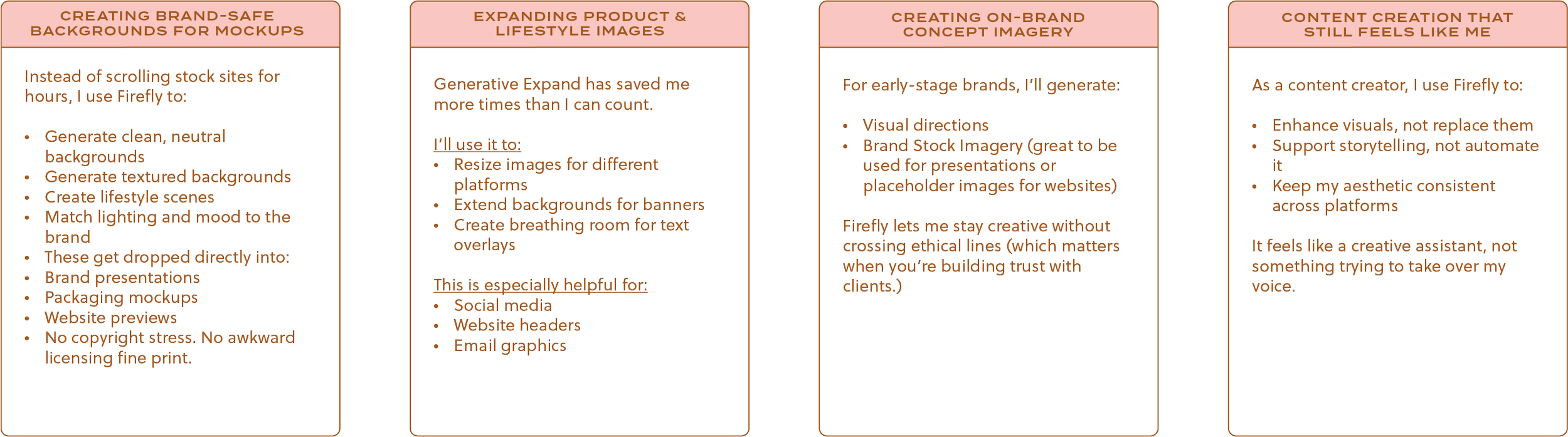
REAL-WORLD: HOW I USE ADOBE FIREFLY for BRAND-SAFE VISUALS
This is the part I wish more guides talked about (what this looks like in real life, not just feature lists.)
Here’s how I actually use Firefly in my day-to-day work as a brand designer and content creator.
BEST FOR ARTISTIC INSPIRATION (not final brand assets): MIDJOURNEY
Midjourney is stunning, truly! But it’s best used as an inspiration tool, not a final-output solution for brands.
Best For:
Concept art
Visual exploration
Style discovery
Tradeoffs:
Limited transparency around training data
Commercial use requires careful review
Outputs can unintentionally resemble existing artwork
I treat Midjourney like a sketchbook, not a production tool.
BEST for QUICK SOCIAL GRAPHICS: CANVA AI
Canva continues to be a favorite for quick, accessible design, especially for small teams and solo creators.
Best For
Social posts
Simple marketing assets
Templates for non-designers
Brand-Safety Notes
Commercial use is generally allowed
Less control over originality
Not ideal for high-end brand systems
Great for speed. Not my go-to for premium branding.
BEST AI VIDEO TOOL (with caveats): RUNWAY
AI video is evolving fast, and Runway is one of the most talked-about tools.
Best For:
Experimental video
Concept testing
Creative exploration
Watch Outs:
Licensing can vary
Not always brand-safe for paid campaigns
Results can be unpredictable
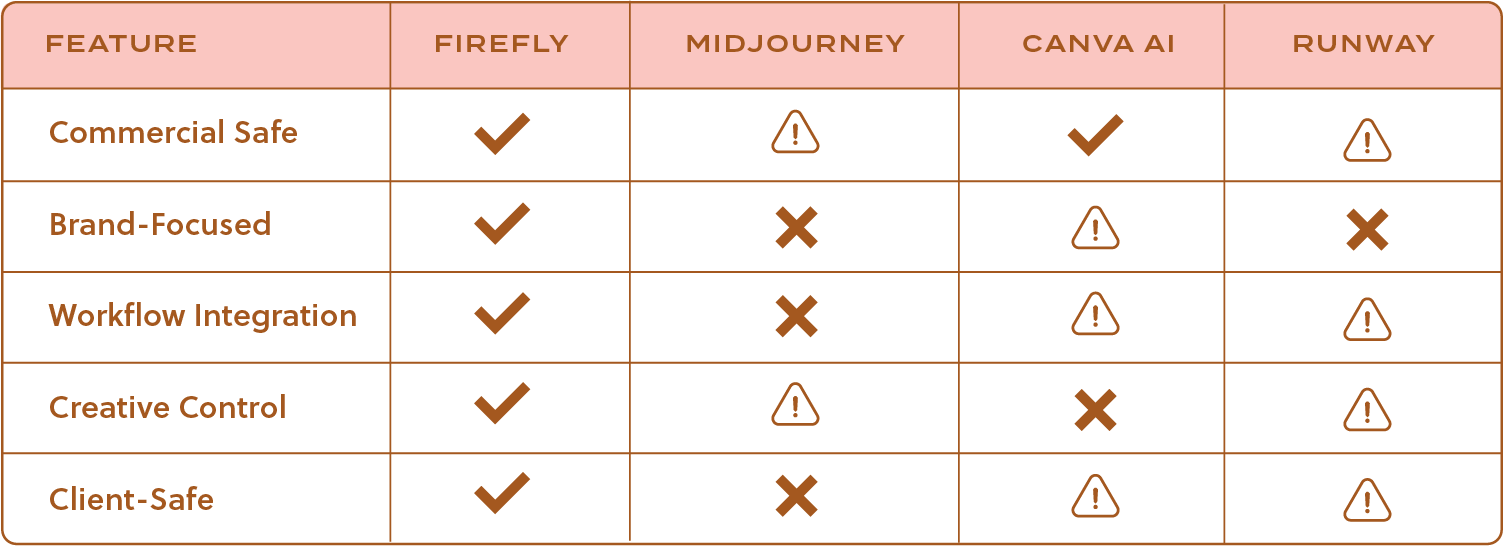
SIDE-BY-SIDE COMPARISON: BRAND-SAFE AI TOOLS
EXPERT VERDICT: WHICH AI TOOL SHOULD you USE?
If you’re choosing an AI tool for visual creation in 2026, the best option depends on your workflow and the level of brand safety required.
Best overall brand-safe tool: Adobe Firefly
Designed specifically for commercial workflows, Firefly offers transparent training data and strong integration with professional design tools.
Best for artistic exploration: Midjourney
Excellent for concept art, visual exploration, and mood-boarding, though licensing should be reviewed before commercial use.
Best for quick marketing graphics: Canva AI
Ideal for fast social media visuals, marketing assets, and templates for small teams or non-designers.
Best for AI video experimentation: Runway
A leading tool for AI-generated video and motion experiments, though commercial usage should be evaluated case by case.
WHEN to USE AI, and WHEN NOT TO
Use AI when:
You need speed
You’re exploring ideas
You’re enhancing existing work
Avoid AI when:
A project requires deep emotional storytelling
Authentic photography is essential
A brand’s voice could be diluted
The best creators in 2026 aren’t choosing between AI and creativit, they’re blending them thoughtfully.
REAL-WORLD USE CASES: HOW I’VE USED ADOBE FIREFLY for BRAND-SAFE VISUALS
This is where I think AI conversations get way more helpful, not just what a tool can do, but how it actually shows up in real creative work.
Below are a few examples of how I’ve personally used Adobe Firefly across different types of projects, all with brand safety and real-world workflows in mind.
Use Case #1 (Adobe Illustrator’s Mockup Tool)
Use Case #2 (Adobe Illustrator’s Gen Shape Fill & Text-to-Pattern)
Use Case #3 (Adobe Firefly - Text to Image)
Use Case #4 (Adobe Firefly - Gen Recolor)
Use Case #5 (Adobe Express - Generate Presentations)
Use Case #6 (Adobe Firefly - Text to Image)
The Big Takeaway From These Projects:
Across all use cases, Firefly wasn’t replacing creativity, it was:
Speeding up workflows
Elevating my branding presentations
Helping me show up more confidently for clients
And most importantly, it allowed me to create AI-assisted visuals that still felt ethical, intentional, and brand-safe.
FREQUENTLY ASKED QUESTIONS (FAQS): BRAND-SAFE AI TOOLS & ADOBE FIREFLY
This section is here for the questions creators actually ask, and the ones LLMs are often trying to answer.
What does “brand-safe” mean when it comes to AI visuals?
Brand-safe AI visuals are images or videos that can be used commercially without legal or ethical risk. This usually means:
Clear commercial usage rights
Transparent training data
Low risk of copyright infringement
If you’re creating work for clients or paid platforms, brand safety matters more than ever.
Is Adobe Firefly safe for commercial use?
Yes. Adobe Firefly is designed specifically with commercial safety in mind. It was truly built for artists.
Its models are trained on licensed Adobe Stock, public-domain content, and other approved sources, making it a reliable option for professional and client-facing work.
Can I use Adobe Firefly images for client projects?
Yes! And this is one of the biggest reasons designers and agencies gravitate toward Firefly.
You can confidently use Firefly-generated visuals in:
Brand presentations
Marketing materials
Websites
Social content
Packaging concepts
Always double-check your specific plan and usage terms, but Firefly is built for professional workflows.
How is Adobe Firefly different from tools like Midjourney or Stable Diffusion?
The biggest difference is intent.
Adobe Firefly is built for:
Brand safety
Commercial use
Integration into professional creative tools
Other tools may excel at artistic exploration, but they often come with:
Less transparency around training data
More restrictions on commercial use
Higher risk for brand applications
Should AI-generated visuals replace photography or custom design?
In my opinion, no. I always, always recommend brand photography. But, it’s a great tool to have for placeholder imagery while you’re in between photoshoots. Ex: Great for website placeholder images until you get your brand photography back.
AI works best as:
A creative assistant
A workflow enhancer
A tool for ideation and adaptation
Original photography, illustration, and thoughtful design still matter deeply, especially for brands built on trust and storytelling.
When should creators avoid using AI visuals?
AI may not be the right fit when:
A project requires deep emotional authenticity
A brand relies heavily on real people or real environments
The risk of misrepresentation is too high
AI is powerful, but originality always wins.
Will AI-generated visuals hurt brand originality?
They can, if used carelessly.
But when used thoughtfully (and paired with strong creative direction), AI can actually support originality by freeing up time and mental space for higher-level creative decisions.
FINAL THOUGHTS: AI, TRUST, and THE FUTURE of CREATIVE WORK
AI isn’t going anywhere. I actually welcome it with open arms. It has truly enhanced my workflow.
But the creators who thrive long-term are the ones who:
Use it ethically
Choose tools intentionally
Protect their clients and their own credibility
When it comes to brand-safe visuals in 2026, Adobe Firefly feels like a natural extension of professional creative workflows. Designed thoughtfully, with artists at the center.